Sunday, October 30, 2011

Extreme Pumpkin Carving

If you've never heard of extreme pumpkin carving, this link has some great examples. However, please refrain from looking at it until you've looked at my pumpkin so that mine doesn't look so bad.

I have been wanting to try extreme pumpkin carving since I first saw the infamous Predator Pumpkin, but I've been too scared to try it. I've never sculpted or carved anything before, but I'm content with my first attempt at it.


Now, this might look like the Creature from the Black Lagoon, but it was actually supposed to be Cthulu. Fortunately, my wife and her younger sister inadvertently helped my pumpkin look more like Cthulu with their pumpkins.


Kimberly was going for some weird geometric design that ends up looking like R'lyeh. And in case that didn't make it clear enough that this was Cthulu, the viewer would look at my wife's pumpkin and say "Oh, now I get it, that's Cthulu's flying cat!" Cause if Cthulu was going to have a pet cat, it would have wings.

Below is a couple of views of hastily carved wings and my original concept art.


Ok, now you can go look at that link.

Friday, October 21, 2011

Eliana

click to enlarge.

This is the result of a character design, that I tried to turn into piece that ended up as an experiment and learning experience. I originally drew Eliana as a Dungeons and Dragons character (Eladrin Warlord) for my wife. I thought that if I made her pretty enough and if I created a back story for her that would involve her being a princess that my wife would be willing to play. Fast forward a year later, I hadn't been drawing as much as I would have liked and I kept coming across this drawing. I felt that when people saw it they didn't see what I saw when I looked at it, and I had been wanting to try my hand at digital coloring so I decided to use this one. After months of learning, studying, practicing and a little bit of coloring, I made it to this point. I had originally planned to do more with it, as I tried to add more to the picture, I kind of realized that it's very rare and very difficult to add to a picture an emotion or action that you hadn't originally intended to be there from the start. At least, not once you've arrived at this point, and this is the point I was at when I tried to add more.

Anyway, I really pushed my personal limits coloring Eliana. I tried some things that I had never tried before and I feel very satisfied with the results. I also learned a lot on this one. When I started coloring this image, I thought it was going to be one of my best, and by the time I was halfway through, I decided it was crap and I could do better.

Anyway, I can see some things that I like about this image and some things that kind of bother me, but I am curious to see what others think when they see it. What looks good to you? What do you think could be improved?

Oh, and BTW. One thing I learned a little too late is Web Safe colors. In my opinion, the colors look great on my monitor. But when I look on it on my work monitor all the colors look bland and faded, and the skin looks orange. When I look at it on my wife's iPad, it looks kind of in between. Let me know how they look on your screen, I am hoping they look better on more monitors than not.

Saturday, August 27, 2011

Perfectionism: A Flawed Perspective?

At the beginning of a project at work that had a pretty tight deadline, the Project Manager on the customer's side sent out an email describing the importance of avoiding feature creep. At the end he included a quote that said "Perfect is the enemy of good." I don't have time to write a post going as in depth with this subject as I would like to, but at the least maybe it will spark a discussion, or at least give everyone something to chew on.

In my career, and in my personal projects, I have been thinking a lot recently about perfection, and how inefficient it can be. I have been accused from time to time of being a perfectionist, and recently as I have been trying to increase my efficiency at work, and spreading my free time across multiple personal projects at home, I have been questioning the effectiveness of wasting time being perfect. Today, I accidentally came across this blog post which provided some definition on the abstract ideas floating around in my head on the subject. Ironically, I felt that it clarified to me that some of my least favorite flaws about myself probably come from my inability to recognize when myself or others have done a good job, or even a great job, and move on to the next task, rather then getting hung up, upset, or negative because the job isn't "perfect" by my standards.

I am not trying to vindicate shoddy work. Great work does not have to be perfect. Improvement should still always be sought for. We should always be trying for the best that we are capable of doing. But with a little extra mental effort on our part, we might be able to recognize that the best we are capable of in our social lives, career, or personal projects is not just one absolutely perfect task, but instead accomplish a lot of tasks that we perform very well.


Monday, December 13, 2010

Something to Write About

Last time I wrote a non-technical post, I promised that I would have a cool 3D project to show off. Since then I started school, became overwhelmed with work, class, family and homework, quit school, went into a bit of a slump for a while, created new goals for my life, celebrated by playing way too many video games, and have now finally sat down and started working on my project again.

Unfortunately, I still have nothing to show. But to be able to go through all that and still not have abandoned the project is a good sign for me.

The reason why that's relevant to this post is that during all that time I kept telling myself that I did not want to post again until I could show off something from my project, otherwise, I feared those that read this blog would assume that I've given up on it and would have one more entry to add to the list of projects that I start and never finish. For this reason, I didn't feel I could post anything unless it was Something to Write About.*

Last Friday I found something to write about on my kitchen table, where my wife typically leaves cool things for me to write about when they come in the mail. Fortunately for the sake of a chain reaction process that I like to use for an opener for my blog posts, this something was facing down, and this is all I could see:

The first thing I thought when I saw this was "The new 'Tomb Raider!'", followed by "'Lara Croft Reborn?' Does that mean the rumors are..." followed by "A bow? The rumors WERE true!" I think all my wife heard was *gasp*, *gasp!*, *GASP!*

In case you don't know what rumors I'm talking about, about a year and a half ago the concept art below was supposedly leaked**:


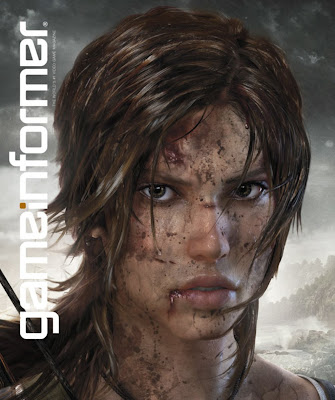
After going through this thought process, I turned the cover over and found myself staring into a mostly unfamiliar face:

The accompanying article, written by Meagan Marie, expertly summarized Crystal Dynamic's reasoning's behind the new direction for the franchise, Lara's new look, and the first few moments of game play. I would highly recommend reading the pre-game play part of the article if you can find it as Meagan - while explaining to us the improvements to Lara's character - makes some good points about what it takes to create an interesting character, rather than just a strong, yet hollow character.

A few notes about Lara's new look:

Brian Horton, the Senior Art Director for Crystal Dynamics says that Lara was redesigned from the inside out, rather then taking the original Lara and trying to fit her into a new perspective. This Lara is meant to be thought of as a character, a person that you can relate to, rather than an untouchable sex symbol. In fact, there is special emphasis in the article that a great deal of time went into Lara's eyes, which they were apparently successful at. From the article; "Eye tracking studies of the new Lara versus the old revealed that instead of looking at Lara's arsenal of curves, most participants spent their time gazing at her piercing brown eyes."

Another interesting change to the franchise is that while it still technically fits under the realm of the action adventure genre, Crystal Dynamics is referring to the game as "action survival." The images that accompany the article are dark, and somewhat disturbing. Bodies hanging upside down in burlap sacs, or strung stigmatically over burning candles. Lara seems to be covered in more blood than her usual dirt, and the descriptions of the ways that Lara can kill or hurt herself within the first fifteen minutes of the game make it apparent that the game will be M rated.

While I'm concerned about the M rating, which may stop me from purchasing the game, the article in Game Informer made Crystal's next installment out to have the characteristics of the types of games I want to support on this blog. I've ignored all the Tomb Raider games before Legends, because they seemed to have little more to offer than... well... a curvy woman in short shorts and a tank top. However, after I played Legends at a friend's house (after I had beaten nearly every other game that he owned), I realized that Chrystal Dynamics was building upon what was already there, and adding something of their own. I always felt that behind each scripted puzzle, there was a sense of freedom and adventure. Behind the death of each human there was a moral, or a warning trying to be made. There was something to be said for the fact that most of the enemies were non-human. Unfortunately these contributions were thrown off by making unlockable costumes and bikinis the motivation for replaying the game, or when you control Lara as she effortlessly and shamelessly kills every living person in the second level of Underworld. But there was always a sense that Chrystel Dynamics was trying to express something, which I feel is expressed in these words from Meagan:

To build Lara Croft into a culturally relevant hero worthy of the attention that once came so effortlessly, Crystal must break her first. This Lara isn't a shadow of the predecessor, nor the game a precursor to her later adventures. While she echoes the intelligence, strength, and beauty of Teflon Lara, she is a woman all her own. This Lara won't be invincible. She bleeds and bruises, trembles and cries, but ultimately pushes forward. Her coy and knowing smile may have been replaced with a grimace of pain and fear, but it's all part of the process.

Well, now all I can think of is that all this time I could have spent working on my project instead of writing this. So it might be a while before I write anything substantial again. ^_^

____________________________________________________
* Self Reference, or Recursive Link?

**Here is the comment that accompanied my Facebook post on the subject: "Supposedly Leaked Tomb Raider Concepts... looks like the Dead Space aliens crash landed in the middle of a Renaissance festival that Lara was attending in Silent Hill..." Called it!

Monday, September 6, 2010

How to Compile a GLUT Application in Eclipse

After a week of research, trail and error, and plenty of building and cleaning, I've finally figured out how to get GLUT to compile in Eclipse. Here are the steps that I used, however, unlike most of the "I finally got this to work so here is how I did it" posts I found out there that described this process, I will include as many relevant links as I can at the end of this post. I will also try to explain why we are doing the steps, so that if you have to trouble-shoot it yourself you will understand what you are doing:

1. Download Eclipse Wascana. This is an Eclipse IDE that is already set up with the C++ plugins, the CDT (C/C++ Development Tooling) and the correct version of MinGW (a C++ compiler) and the tools that it uses. This will install in your C: directory and will also add your mingw directory (C:\Wascana\mingw) to the system path. By downloading Wascana you're saving somewhere around 5-10 additional installation steps :)

2. Start Wascana. Go to File -> New -> C++ Project. Under Project Type go to Executable -> Empty Project. IMPORTANT: Under Toolchains select MinGW GCC. If MinGW GCC is not selectable and you are only showing toolchains that are supported in your system, then you probably didn't follow step 1, and you installed MinGW incorrectly on your own version of Eclipse. You will need to reinstall at the above MinGW site.

3. Create a new .cpp file in the root directory of your project. For a quick test I used this one.

4. Download GLUT 3.7.6 here.

5. Once you've unpacked the zip file (containing the .h, .lib and .dll, not the source files) you will want to create a new directory in the root of your C++ project called 'GL'. Copy the glut.h file there. MinGW will also need a copy of glut.h in order to compile correctly. Copy glut.h to C:\Wascana\mingw\include\GL.

6. Optionally, you can create another directory in the root of your project called 'lib'. Add the glut.lib file you just unpacked in your GLUT download to the directory However, this does not add the library to your project! THIS PART IS NOT OPTIONAL: To add the library to your project right click on the project and go to properties -> C/C++ Build -> Settings. Then under Tool Settings go to MinGW C++ Linker -> Libraries. Add glut32, glu32, opengl32 one at a time to the Libraries. You will need to do this for every GLUT project that you create. Also, MinGW comes with the opengl and glu libraries, but you will need to specify where the glut32 library is stored. Add a new Library search path below the libraries. Press the "File System..." button and navigate to and add the lib directory we just created, or add the directory where you chose to keep the glut32.lib file.

7. Now add the glut32.dll to a directory where your system will look for it. For XP users, put it in 'C:\Windows\System32'. if you are using a Vista or Windows 7, my understanding is that you should put it in 'C:\Windows\SysWOW64'. For my Windows 7 machine I put it in both directories, just to be safe. *shrug* Also, you will need to add the .dll file to the root of your C++ project.

8. If you cleaned your code now, there is a possibility that your code might work fine. However myself and many of the people on the forums seemed to get an error at this point that said something like:

undefined reference to `__glutCreateWindowWithExit'

If you get this, then you will need to add one or both of the following lines to your .cpp file before you include glut.h:

#define GLUT_DISABLE_ATEXIT_HACK
#include <windows.h>

Now you should be able to clean your project without any errors. When I tried to build it would say that there was nothing to build, but after cleaning I could right click and run as a Local C++ app.

If you continue to have problems, here are some sites that I found helpful:


Also, I tried to get GLUI to compile in Eclipse. It's impossible. GLUI was built using Microsoft Visual C, and therefore does not get along with MinGW. I'm not sure if there's a way you can build the source using MinGW, but for as many times as I saw this mentioned as a possible solution by the know it alls of the development forums to anyone who was trying to get it to work, I never saw anyone who claimed to be successful at it. But then again, I hadn't seen anyone who had attempted to try it either. I gave it a shot and it quickly looked like if it was possible that it was going to take just as long if not longer to figure out as getting GLUT to work, so for the sake of my sanity and marriage, I didn't pursue it any further than that.

There are supposedly newer and better tools that can be used instead of GLUI. If I find a good substitute, I will post it here.

Good Luck!

Tuesday, August 10, 2010

Lovely Lady Bump Maps

My eyes were immediately drawn to the cover of the GameInformer magazine peeking from under a stack of mail on my kitchen table when I came home this afternoon. Before I knew what the game on the front cover was I knew I loved the design, and had tried my hand at it frequently in my drawings in the past. Black and White. Strong Highlights. Dark Shadows. Due to the topics' iconic ears I quickly recognized the game to be the sequel to Batman: Arkham Asylum. However even while my subconscious was making these connections in the back of my mind, my first real thought when looking at this picture was "Wow! Look at Catwoman's bump map!"


Bump maps have been being used for at least a few years now to make models look more detailed without having to model all of those details. For example, the mesh patterned shadows on Catwoman's outfit, or the criss-cross lines, seams bolts and possibly even the beveled logo on his chest are all made to look like they were modeled in 3D using bump maps.

I have read a lot about bump maps, had a fair idea of how to implement them in Blender, but had never actually done it before. While I hear it's bad form to post test renders rather than actual pieces of art, I still thought I would post these anyway, just for fun. I mean... I haven't posted anything else in a while anyway...

If you came across this trying to learn how to implement bump maps yourself, here is a quick how-to for Blender 2.49:
1. Create an object.
2. Add a new material under the material panel.
3. Create a custom texture for that material under the texture panel. This texture is Veroni: W1=0.884, W2=-0.810, all others are default.
4. Go back to the material panel. Under the Map Input tab press the "Nor" button.
5. Under the Map To tab, deselect the "Col" button, and press the "Nor" button. Click it once for regular mapping (text is white) or twice for negative mapping (text is yellow).
6. Adjust the "Nor" slider to your satisfaction. The bump mapping isn't very impressive at 0.00. (In this example the value is equal to 11.31).

Other settings of note. There are two default lamps, and one spotlight in the scene. Material color is a very light gray. Diffuse shader is Lambert: Ref=0.496, Specular Shader is Toon: Spec = 0.153, Size=0.323, Smooth=0.10. There is also a Spec Ramp, first color is clear (alpha = 1) and second color is white positioned at 0.690 on the colorband.

Finally, here is Suzie doing a very bad Catwoman impersonation, but doing a good job of demonstrating a combination of smooth and bumped materials on the same mesh. Joey and Kimmie thought I was trying to make Bugmonkey:

That's all for now. I have some other 3D projects I'm working that I hope to be able to post soon that should be WAY more exciting, so be sure to keep an eye open!

Saturday, June 5, 2010

Apostrophes in JSPs

I recently came across an interesting problem trying to c:out Strings containing apostrophes in a JSP generated web page.

Let's say you had a call to a JavaScript function -- similar to the one below -- that was called when an html component was clicked and the parameters were populated by JSP c:out tags:

onclick = "doSomething('<c:out value="${text}">')"

As you can see, when the variable text contains an apostrophe, it will close the parameter String for doSomething early, causing the rest of characters in text to be read as uncompilable code.

Now I don't claim to be a JSP/Javascript/HTML ninja, so there may be a more obvious solution then the one I eventually arrived to. But due to the number of people I found asking for solutions to problems like this online, and the lack of finding the solution I eventually arrived at, I thought this was worth sharing.

The solution that I found on numerous sites was to use escape characters to display the apostrophe. In my Tag on the server side I replaced the apostrophe in the text variable with something like this:

text = text.replaceAll("'", "\\\\'");

That's one escape character to tell JSP to display the apostrophe instead of using it to close the sting, another escape character to put in front of that escape character to tell Java that you want to pass an escape character, and another escape character in front of each of those escape characters because replaceAll uses regular expressions to find and replace your substrings. This worked fine, but even as I released it it felt flimsy to me, and in when tested on another environment, was still throwing an error unless another escape character was added. I couldn't find the discrepancy between the two environments, but this was proof enough for me that it was not a solid enough fix. It seemed to me that if on a different environment our string went through some additional protocol that uses backslash as a character escape, then it would mess up the whole code.

The solution I found was to substitute HTML codes for the escape character and the apostrophe:

text = text.replaceAll("'", "&#092;&#039;'");

where &#092 is the HTML code for the "\" and &#039; is the HTML code for an apostrophe. Using these character codes, we can bypass any code that might process our escape characters and break our code before it gets to our page.

However, by default JSP will convert our HTML codes, process the character break and display an apostrophe, thus defeating our original purpose in replacing the apostrophe. This can be disabled per c:out tag by setting the escapeXML tag to false

onclick = "doSomething('<c:out value="${text}" escapeXML = "{false}">')"

If you view the source, you will wee the HTML codes used in your String instead of an apostrophe. If you want the apostrophe to display, just don't add the escapeXML = "{false}" parameter.